How To Change the Local Site Name
Use this guide to change the Local Site Name of your PIM+ installation (for example from Localhost to another name).
Step 1: Stop the PIM+ service
- Go to Services (
services.msc). - Right-click the PIM+ service and choose Stop.
- Confirm that the service status is Stopped.
Step 2: Open sites.dat
- Open the PIM+ installation folder on the server, for example:
C:\Program Files\PIM+\- or an other path (if you use a non-default path)
- Open the file
sites.datwith Notepad (or another plain text editor).
Step 3: Change the Local Site Name
- In
sites.dat, locate the<site>block for your local site. - Find the
<name>element inside that block. - Change the value between the
<name>tags to the desired Local Site Name.
Example:
<site>
  <name>Localhost</name>
  <id>1</id>
Change Localhost to your new site name, for example:
<site>
  <name>Master</name>
  <id>1</id>
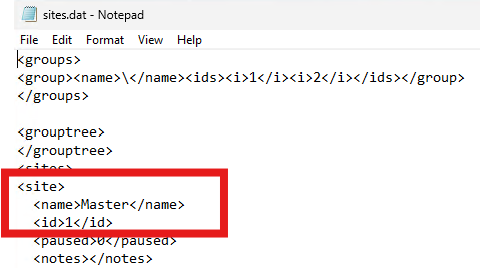
- Save the file and close Notepad.
Step 4: Start the PIM+ service
- Return to Services (
services.msc). - Right-click the PIM+ service and choose Start.
- Confirm that the service status is Running.
- Log in to the PIM+ console and verify that the Local Site Name is updated.
The Local Site Name is now changed.