Linux/SSH Login Event Monitor Reference Guide
notitie
Overview
The Linux/SSH Login Event Monitor is designed to monitor for logins, addition or removal of users, and other security events on your Linux systems. It leverages the 'lastlog' command on systems that support it to provide timely alerts based on user security events.
info
Use Cases
- Detecting logins to the system.
- Receiving alerts about the addition or removal of users.
Monitoring Options
This event monitor provides the following options:
SSH Server Connectivity
- Alert with [Info/Warning/Error/Critical] if the SSH server is unreachable: Receive alerts if the SSH server can't be reached.
tip
User Activity Alerts
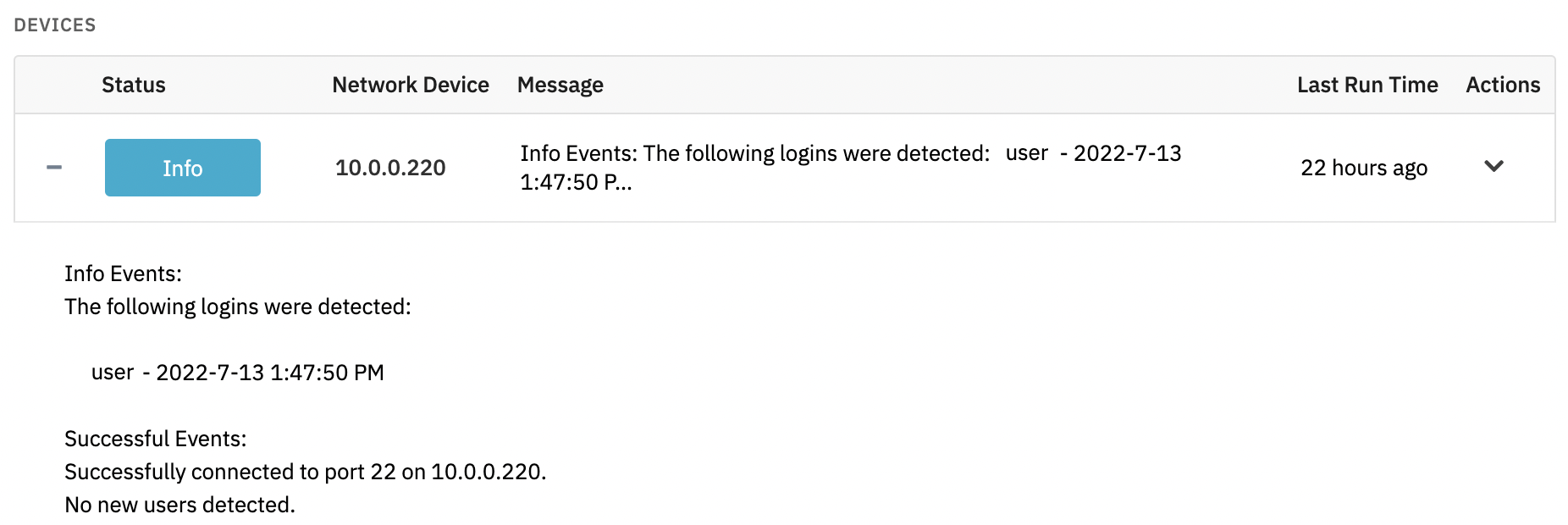
- Alert with [Info/Warning/Error/Critical] if a user logs in: Get an alert whenever a user logs into the system.
- Alert with [Info/Warning/Error/Critical] if a new user is detected: Be notified if a new user is detected on the system.
- Alert with [Info/Warning/Error/Critical] if a user has been removed: Receive alerts if a user has been removed since the last check.
Notification Customization
- Include the list of users in all notifications: Add a list of all users and their last login details to every notification.
- Only alert about the specified users: Set alerts for specific users by entering a comma-separated list of usernames.
- Ignore the specified users: Exclude certain users from alerts by specifying a comma-separated list of usernames to ignore.
Connection Configuration
- Port Number: If your servers use a non-standard port instead of the default SSH port 22, specify it here.
- Timeout: Set the maximum time to wait for a connection before timing out.
Authentication and Security
The user account used for SSH must have interactive login rights and the necessary permissions to execute the lastlog command for monitoring purposes.
Protocols
Data Points
This event monitor doesn't generate any data points.
Sample Output