Microsoft Resources Event Monitor Reference Guide
Alerts about Microsoft Azure resources and resource groups.
Overview
The Azure Resources Event Monitor watches and alerts about Microsoft Azure resources and resource groups.
Use Cases
- Detecting new or deleted resources
- Keeping a table of current resources handy
Monitoring Options
This event monitor provides the following options:
-
Alert with [Info/Warning/Error/Critical] if Azure cannot be contacted: If the event monitor cannot contact Azure and this option is selected, PIM+ will send you an alert of your choice.
-
Alert with [Info/Warning/Error/Critical] if there are new resources since the previous check: Select this option to receive an alert if the event monitor detects new resources that have been added since the last time the event monitor performed checks.
-
Alert with [Info/Warning/Error/Critical] if a resource is updated: Use this option to get alerts if a resource has been updated.
-
Alert with [Info/Warning/Error/Critical] if a resource is removed: This option will send you an alert if a previously discovered resource is not found upon subsequent event monitor runs.
-
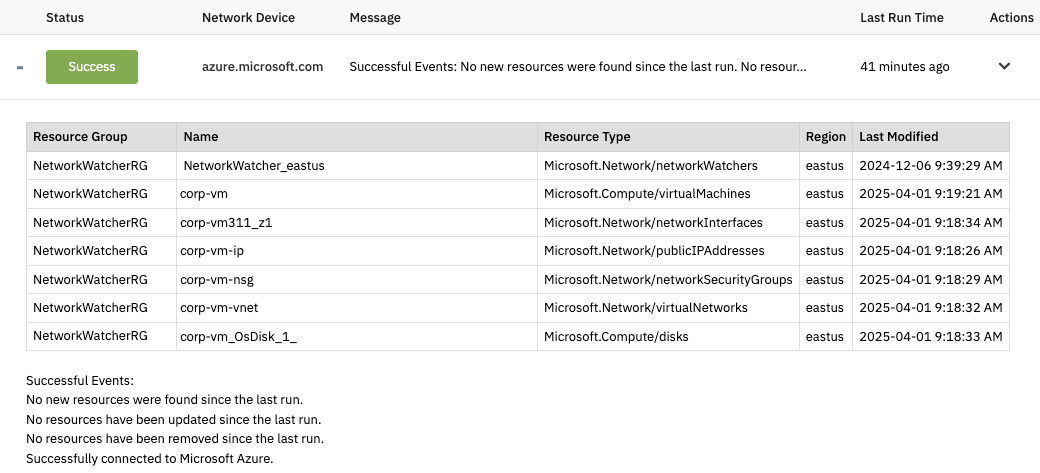
Include a table of resources [before all/after all] event text: Check this box to include a table of resources either before the event text the monitor generates or after. The following sub-options control the information that will be included in the table.
-
Include all the resources
This option includes all resources in the table that will be generated each time the monitor runs. -
Include new resources
This option will include only new resources in the generated table.
-
-
Only check the following resource groups: Check this box if you want to specify the resource groups that will be checked. All others will be skipped. Enter multiple resource groups one per line.
-
Resource groups to ignore: Check this box and enter the names of resource groups that the event monitor should skip monitoring. All others will be checked.
-
Only check the following resources: Use this option to specify the resources you want checked. The event monitor will skip all others.
-
Resources to ignore: Use this option to specify resources you want the event monitor to ignore. All other resources will be checked.
-
Only check the following resource types: Check this box if you want to enter the resource types that the event monitor should check. Resource types that aren't listed here will not be checked.
-
Resource types to ignore: Use this option to list resource types to ignore. All other resource types will be checked.
Authentication and Security
The account used for authentication must have read permissions at the subscription level.
Protocols
Data Points
This event monitor generates the following data points:
| Data Point | Description |
|---|---|
| Deleted Resources | List of deleted resources. |
| New Resources | List of new resources. |
| Resources | List of all resources. |
| Updated Resources | List of updated resources. |
Sample Output